
What is File Integrity Monitoring (FIM)? Importance and Best Practices
Published: October 7, 2025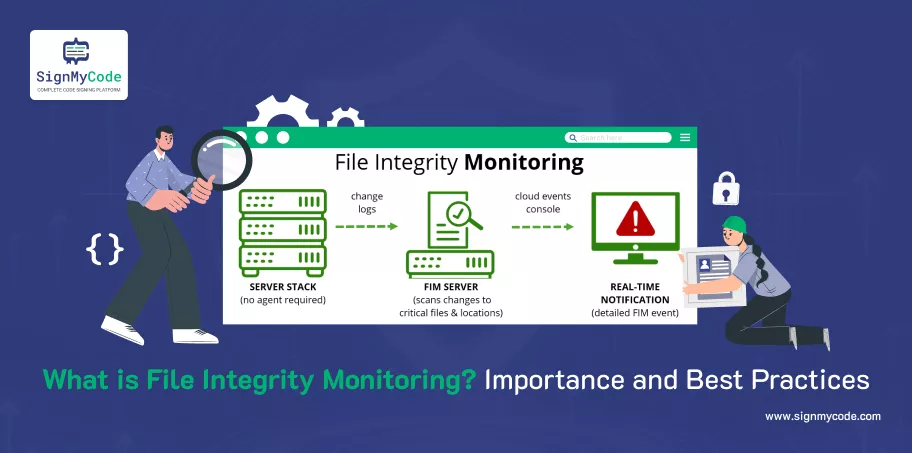
What is File Integrity Monitoring?
File Integrity Monitoring (FIM) is a process that provides security by monitoring and verifying changes made to critical files, directories, and system configurations in an IT environment.
This is accomplished by taking the current state of files, operating system binaries, application files, configuration files, logs, or sensitive data, and comparing them against a known and trusted baseline.
When unapproved changes are detected, FIM sends alerts to administrators to help identify, and more importantly, confirm breaches in security, malicious activity, or a misconfigured system.
FIM is a critical component of compliance with any accepted standard, such as PCI DSS, HIPAA, and ISO 27001. FIM is useful for planning forensic investigations and for adding a layer of cybersecurity by assuring the integrity, authenticity, and reliability of critical files.
Why do you need to procure a FIM Solution?
Detect Unapproved System Changes
A FIM solution continuously monitors critical files, directories, and system configurations to help identify unauthorized or unexpected changes.
Whether it is a system binary, application file, or configuration setting, any change indicates a potential security breach, malware infection, or insider threat.
Moreover, FIM gives administrators immediate and automatic alerts when changes are made, allowing an organization the opportunity to quickly mitigate and respond to the potential issue and minimize any unwanted situation.
The benefit of proactive monitoring for systems allows for the assurance that any and all changes were made in connection with the organization’s original purpose and intentions (authorized). Any opportunity for malicious activity was monitored to ensure its integrity.
Prevent Data Breaches
File Integrity Monitoring is critical to keeping sensitive organizational information (financial records, digital keys, credentials, certificates, and confidential business data) free from unauthorized alterations or access, which could lead to data breaches, financial loss, or brand damage.
FIM alerts you in real-time of potential data tampering or unauthorized access to your organization’s critical files, helping to minimize your risk of data theft or data manipulation.
While protecting your critical files, FIM helps to protect your organization’s most valuable digital assets, unknown to most.
Support Compliance
Several regulatory frameworks, such as PCI DSS, HIPAA, ISO 27001, and SOX, specifically mention file integrity monitoring within their security controls.
FIM creates a secure log audit trail of file changes, demonstrating that security controls are in place, i.e., the entire file repository has been reviewed for any file integrity control issues.
This helps to ease compliance reporting and helps organizations demonstrate they have successfully passed a security audit.
Without the ability provided by FIM, it is difficult, if not impossible, to demonstrate the security of sensitive files and system configurations, which may result in pending compliance action and/or potential penalties in the event an organization is unable to verify.
Support Forensics and Incident Response
In the aftermath of a security incident, FIM does much more than provide logs; FIM solutions provide detailed logs that show you specific files that were altered, the time a change was made, and whose account made any changes to files.
This is very important when trying to do forensics, as it helps security teams understand the extent, cause, and damage of the incident. FIM allows you to see, in a very clear fashion, unauthorized changes made to files.
Recommended: What is Code Integrity? How to Ensure Code Integrity During SDLC?
Moreover, it allows organizations to respond quickly, minimize the downward momentum of an incident, start to strengthen a position, and begin putting in place key preventative measures against future incidents.
Essentially, FIM turns reactive incident handling into an effective process that is both proactive and informed.
Strengthen Overall Security Posture
FIM is an important aspect of depth-in-defense to the organization’s cybersecurity posture. FIM provides continuous confirmation of the integrity of system files, applications, and configurations.
In addition, it works seamlessly with other security tools, including Antivirus, Firewall, and Security Information and Event Management (SIEM) systems.
When done in real time, this continuous checking helps to identify potential vulnerabilities before it is exploited by an attacker.
Organizations now have reduced risks, increased reliability, and early indicators of potential threats and overall improvements in confidence in their organization’s IT security framework. Overall, organizations are creating more resilient and secure environments.
How often should Windows File Integrity Checks be conducted?
Windows file integrity checks should be conducted consistently and often to help guarantee that core system files, application files, and configuration files are not modified or altered in any way.
For most organizations, the following timeframes can be utilized:
Critical System Files (e.g., Windows System32 and Registry hives):
At least daily or ideally in real-time, as this ensures that core OS files are not modified by malware or ransomware or, at a minimum, that any such modifications can be caught immediately.
Application Files (e.g. Program Files and Program Files (x86)):
Once weekly file integrity checks should be adequate unless the application contains sensitive data or is modified frequently, in which case daily file integrity checks would be warranted.
Configuration Files and Sensitive Data:
Files that contain or control core functionality or networking, and files that include usernames and passwords, would also lend themselves to at least daily or real-time checks.
Log and Audit Files:
Ideally, logs and audit files would be monitored in a continuous fashion since attackers commonly try to alter logs in an attempt to hide their activities.
What data should Windows File Integrity Monitoring cover?
Operating System Files
Windows operating system files like binaries, libraries, and system executables (Located primarily in C:\Windows\System32 and C:\Windows\SysWOW64) form a core part of operating system software.
Changing, modifying, or replacing anything within a back-end kernel space, including all operating system files, is critical. All unauthorized changes can impair system integrity and stability, execute attack code from your local disk, and enable new security exploits for a malicious actor.
Recommended: What are Software and Data Integrity Failures? How to Prevent?
FIM should track all creation, deletion, and modification of file activity on Operating System files. Being able to perform action tracking, in this way, helps identify in advance of malware execution various malware attacks, like rootkits or ransomware.
This attempt to overwrite important OS binaries, not to mention important Windows service files and drivers, requires monitoring to protect system integrity and authorized access to any critical and/or privileged module.
Application Files
Application files consist of ancestor executables, libraries, and support files, all in folders called C:\Program Files and C:\Program Files (x86), typically.
There exists an entire catalog of critical applications, which include: antivirus, firewalls, productivity suites, and custom business applications. Application files are critical for applications to do their jobs.
Monitoring encloses and ensures that malicious or unauthorized changes to an application are made and will not alter application security, application function, or licensing breaches. FIM will provide detection of tampering, version altering, and accidentally corrupting executables.
Recommended: What is a Code Repository? Types, Best Practices and Tools for Repository Security
In general and in partnership with human capital, application files help mitigate risks for malware injections within application binaries and associated configuration files.
Most importantly, knowing if a binary has been hijacked can assist an organization with continued or rapid operational continuity in business.
Configuration Files and Registry Keys
The configuration files and Windows registry settings are what control system behavior, network settings, application configurations, and user permissions.
There are configuration registry hives, such as HKEY_LOCAL_MACHINE and HKEY_CURRENT_USER, that store critical configuration settings for the operating system.
If those configuration settings are changed (and likely changed in a nefarious manner), those attackers could cause privilege escalation, disable security policies, or cause applications to be misconfigured.
Configuration files that applications use are equally important. These text-based files also control operational behavior.
FIM means sim monitoring the configuration files and registry, providing a means to identify unauthorized changes to those files, thereby allowing sponsoring organizations to maintain a predictably secure system and application behavior to their policy and guidelines.
Log Files
Log files are files that contain detailed records of systems and applications’ activities, logging user logins, access attempts, and access errors. Log files that are common with Windows include Event Logs, Security Logs, and Application Logs.
Log files are routinely accessed and modified by attackers to erase traces of malicious activity, meaning logs are a high priority for monitoring.
File integrity monitoring should focus on log files to determine if someone is trying to compromise the log file integrity or to see if the files were tampered with in any way before becoming aware of an incident.
There is also an advantage if log files are centralized or stored in a place that is tamper-proof, since that would give forensics access to logs, auditing, or possible incident response, regardless of where system logs were located after an event.
Centralized logs help forensics analysts try to reconstruct events when analyzing an incident related to system and application log files.
Digital Keys, Certificates, and Credentials
Digital keys, digital keys, SSL/TLS certificates, and credential files are essential components of secure authentication, encryption, and preservation of data.
Monitoring files such as .pfx, .cer files, and credential stores are crucial in protecting against the unauthorized creation, use, or theft of these files.
File Integrity Monitoring will protect .pfx files, .cer files, and other credential files from being modified or replaced, possibly rendering secure communications, secure encryption, or secure access to systems inoperable.
Also, monitoring SSL certificates mitigates the possibility of trusted relationships following through requests of internal and external communications attacks, such as man-in-the-middle attacks or unauthorized access to decrypt data.
Critical Business or Sensitive Data
Critical business data includes financial records, customer information, intellectual property, and personally identifiable information (PII). These files are often targeted by attackers who seek financial gain or a competitive advantage.
FIM watches over this critical data and helps to monitor files for unauthorized access, modification, deletion, or corruption. Identifying malicious alterations to this sensitive data in real time will ensure its confidentiality, integrity, and availability are maintained.
FIM, in conjunction with backup and encryption protocols, is able to help organizations protect their data as well as protect their reputations and compliance requirements.
How does FIM in Windows Detect Threats?
Windows File Integrity Monitoring (FIM) works by always monitoring critical files, directories, and configurations for unauthorized or unexpected changes to identify a threat.
FIM gathers information about files and important data under monitoring, and compares the present file state to a trusted baseline (the correct, secure version of the file).
If changes are detected, such as modifications to or deletions, or additions to the file, FIM will flag these occurrences as an alert or warning of a potential threat.
Here’s a detailed breakdown of how Windows FIM detects threats:
A baseline comparison
File integrity monitoring (FIM) uses cryptographic hashes like SHA-2 or MD5 for critical files and establishes trusted baseline states using the derived hashes. Each uniquely generated hash encapsulates the content of the file being monitored.
When FIM is operating, it recalculates a hash and compares it to the baseline state. Any difference will indicate that the file has changed in some way. Changes can be a result of malware, ransomware, or unauthorized configuration changes.
The method is realistically able to detect even the smallest environmental modifications that could negatively impact integrity.
Change Detection in Real-time
Some of the more advanced FIM solutions can integrate with the Windows kernel or the operating system’s file system and monitor targeted files in real-time.
This means if a file is opened, changed or modified, or deleted, then it creates alerts immediately in the event monitoring console.
This provides security teams with real-time notifications of attacks and the opportunity to react at the moment difference is known to have existed.
This depends on the speed of the attack; however, it has reduced the risk of data loss and compromised systems when faced with the potential for an attack, especially if the attack is rapid in nature (like ransomware encrypting numerous files in one shot).
Enable Real-Time Monitoring
When feasible, enable real-time monitoring of files, directories, and system changes to identify undesired alterations as they happen.
Real-time alerts become even more important for files that pose a greater risk, such as system binaries, system logs, and credentials.
Real-time alerts allow security teams to identify and respond to threats automatically and effectively, which minimizes time to expose and therefore damages that can be inflicted during an attack (such as ransomware or insider threats).
Combine real-time alerts with automated alerts and event response systems for incident response.
Leverage or Integrate FIM with SIEM and Security Tools
Consider leveraging or integrating your file integrity monitoring (FIM) solution with Security Information and Event Management (SIEM) systems to correlate file change events as they relate to other security alerts you may have collected.
Correlating file change event data and other security alerts provides contextual awareness of the local and global activity and helps the organization to determine composite risk for major file changes at crucial locations.
It also allows consolidated logging, automated reporting, and faster forensic examinations of incidents, which increases the holistic view and visibility into your IT environment.
Review and Update the Monitoring Scope Regularly
IT environments are dynamic! They change all the time. New applications, tools, and updated system configurations may continually alter your environment, which means that your last assessment of file integrity monitoring is likely getting further dated every day or week!
Regularly review your monitored files and directories to ensure that your plan is covering all vital files and that outdated monitoring rules have been deleted.
Maintaining regular assessment and updates of your file integrity monitoring will better assure your organization that your monitoring will be relevant to threats your organization cares or needs to care about.
Keep Detailed Logs and Audit Trails
Make sure to log all file changes in detail to include the path of the file, the change that was made to the file, which user or process made the change, and the date and time of the change.
Keep your logs secure and tamper-proof so they can serve as evidence for investigations, audits, and government reporting.
Detailed logs will help determine whether the suspicious activity is a pattern or trend. In addition, you will need detailed logs for demonstrating compliance with PCI DSS, HIPAA, ISO 27001, and other standards.
Regular Testing and Validation
Test your FIM solutions on a regular schedule to ensure it is working properly with respect to detecting unauthorized changes and generating accurate alerts. Validate the monitoring rules and validate the alerting workflow.
Testing by a simulated change can help identify gaps or false positives and help tune the system to its most efficient operation. Regular testing will confirm that your FIM solution works as intended over time.
Automate Responses
Consider automating responses to certain serious events if you can. This could take the form of reverting unauthorized changes, isolating the file or files that were impacted, or triggering a security workflow immediately.
Automation offers a quicker response time and takes the human factor out of it, so you are increasing your incident response efficiency.
Conclusion
Secure your software and build trust with every single download. SignMyCode fully integrates into your continuous integration and deployment pipeline to guarantee authenticity, integrity, and protection against tampering.
Don’t allow unsigned and untrusted applications to jeopardize your users or your reputation, so Get Trusted Code Signing Certificate today and deliver your software with confidence.
Trusted Code Signing Certificates
Prevent Code Tampering and Authenticate Code Integrity by Digitally Sign your Code with Trusted Code Signing Certificates.
Get Code Signing Certificate

